BalloonFlow AI | AI Balloon Garland & Backdrop Design App
BalloonFlow AI

Coming soon to the Apple App Store

Design it. Price it. Book it. Build it—with BalloonFlow AI.

Analyze balloon garlands, create client-ready mockups, prepare profitable proposals, collect signatures and deposits, and manage every event from one iPhone app.

Built for iPhoneBe among the first to test BalloonFlow AI

AI Garland Check Expert
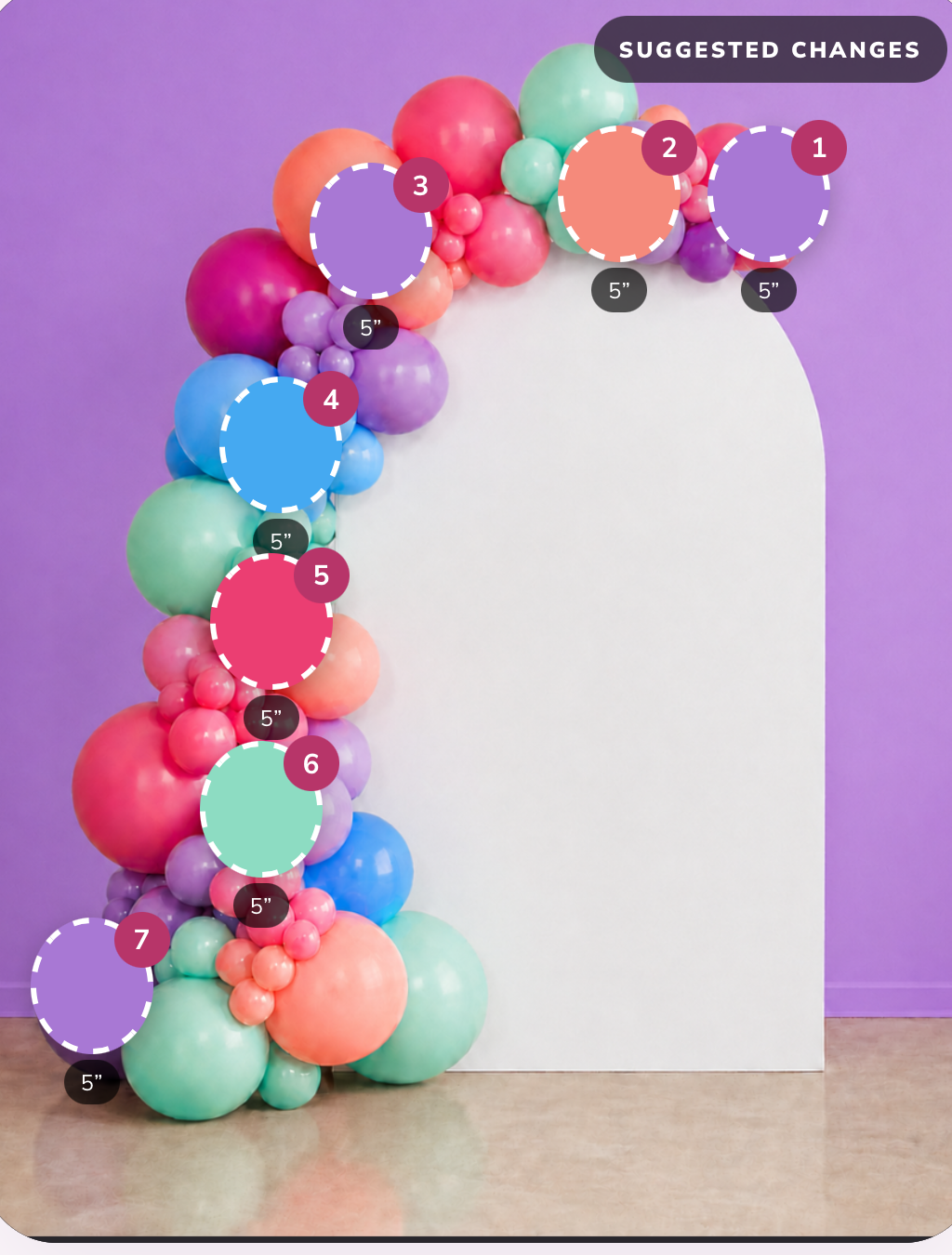
Balloon garland photo with AI suggested placement markers
89 Design score Strong color flow · 7 suggestions
Taper the right end with two 5″ lavender
Deepen the crown seam with 5″ coral peach
Bridge the lower run with three 5″ mint
Save design

Made for balloon artists, event decorators, balloon businesses, and creative beginners.

Spend less time second-guessing your designs.

Choosing balloon sizes, balancing colors, estimating quantities, and showing clients what an installation could look like can take hours. BalloonFlow AI brings design guidance, visual mockups, planning tools, and business workflows together in one app.

AI Garland Coach

Turn one photo into a better balloon design.

Upload an existing photo or take one with your iPhone camera. Choose the coaching level that fits you, and BalloonFlow AI reads the garland and returns specific, buildable guidance.

Beginner coaching Expert coaching
  • Garland scoring for color flow, balance, coverage, balloon sizes, and placement
  • Estimated garland length and balloon quantity
  • Visual placement markers showing where balloons should be added
  • Suggestions for balloon color, size, and placement
  • Up to 15 Expert suggestions per photo
  • Lower garland and base placement suggestions
  • Shopping and “Add to your kit” recommendations
  • Similar color matches from popular balloon manufacturers

How an analysis runs: Upload photo → Analyze garland → Review score and Suggested Placements → Review What to Add → Add items to your kit → Save the analysis.

Garland analysis

Design score 89

Your photo with suggested placements

Garland photo with numbered AI placement markers and size labels
  • Taper the right end with two 5″ lavender
  • Deepen the crown seam with 5″ coral peach
  • Bridge the lower run with three 5″ mint

BalloonFlow Pro

From first inquiry to final installation.

Pro adds the business side of balloon work: leads, calendars, quantities, pricing, proposals, contracts, deposits, and reports—kept with the design they belong to.

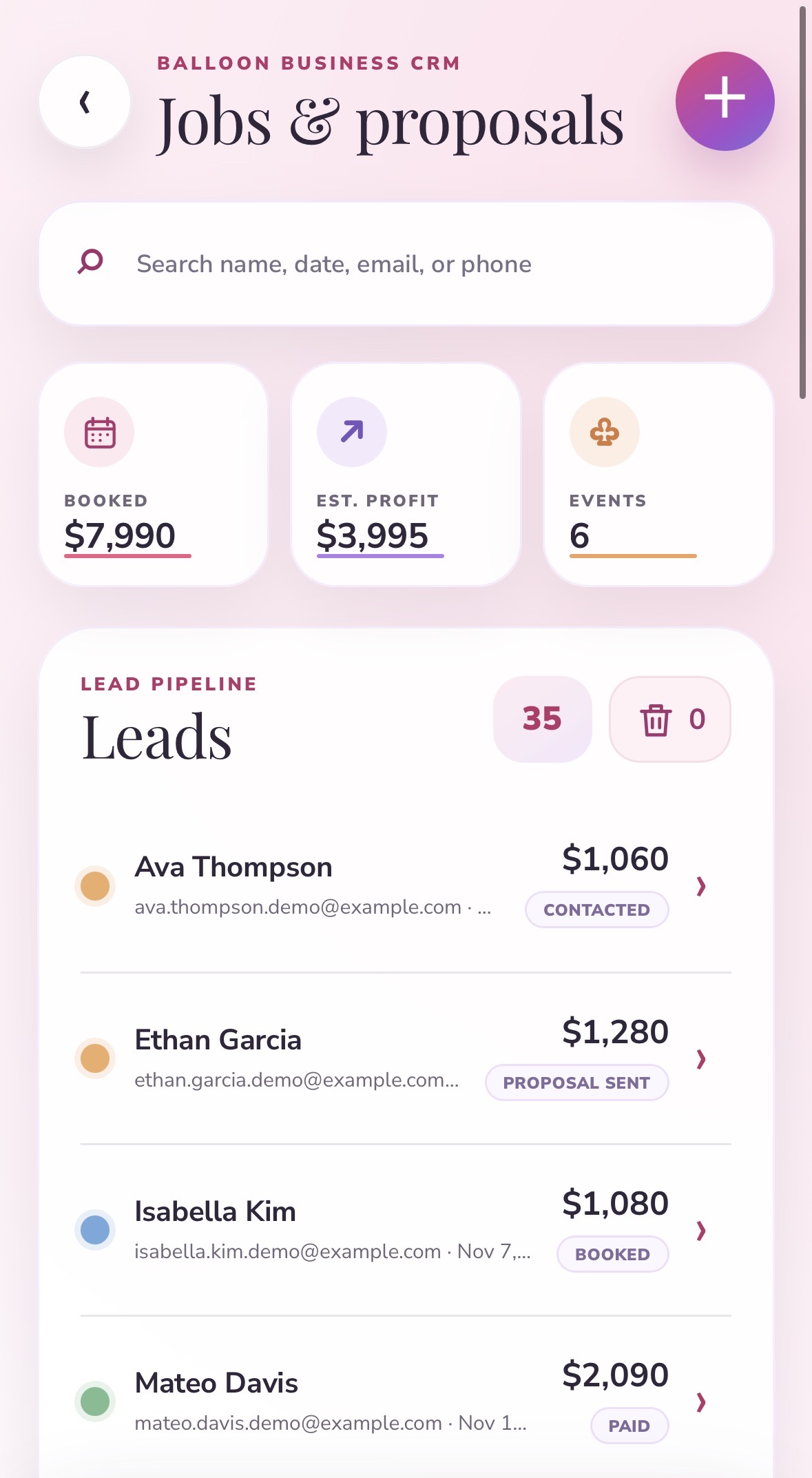
BalloonFlow Pro jobs and proposals screen: booked total, estimated profit, event count, and the lead pipeline

Jobs & proposals

Every inquiry lands in one pipeline with the money already totalled: booked revenue, estimated profit, and how many events are on the calendar. Search by name, date, email, or phone, and move each lead from contacted to proposal sent to booked to paid.

Contacted Proposal sent Booked Paid

Complete lead and event CRM

Pro
  • Create new leads
  • Use the client’s name as the lead name
  • Save contact information, event date, start and end times, and full event address
  • Upload event-space photos or attach saved mockups
  • Search leads by name, date, email, or phone number
  • Lead pipeline statuses
  • Automatic status changes after approval, signing, deposit, and final payment
  • Booking calendar with event counts by date
  • Click calendar events to open the associated lead
  • Events shortcut
  • Trashed Leads inbox
  • Restore deleted leads for up to 15 days
  • Installation checklist and progress tracking
  • Save successful jobs as reusable recipes
New lead Proposal sent Signed Booked Paid in full

Balloon quantity, pricing, and profit

  • Select garland length and design density
  • Estimate balloon quantities and 10% spares
  • Plan balloon-size mixes and estimated bags
  • Estimate build time
  • Enter material and labor costs
  • Add travel, setup, strike, rental, delivery, or rush fees
  • Create custom-named additional fees
  • Apply a discount
  • Choose a target profit margin
  • Calculate the final Total
  • Calculate the required deposit
  • Review estimated profit and job value

These are planning estimates, not guarantees. Confirm venue measurements, manufacturer quantities, and installation requirements before you build.

Proposals, branding, and contracts

Send polished proposals that are easier to approve.

  • Add the balloon business’s name and logo
  • Add the business email used for proposal replies
  • Edit a reusable service agreement
  • Upload an existing contract PDF
  • Attach a mockup from the Gallery or upload one from the phone
  • Generate a branded proposal and contract
  • Display palette colors clearly without overlapping text
  • Include additional fees, discounts, deposit, and final Total
  • Email the proposal directly to the client
  • Download a branded PDF
  • Share a secure client proposal page
  • Let the client review the complete contract before signing
  • Let the client approve or request changes
  • Collect an electronic signature
  • Save the signed agreement under the lead
  • Notify the balloon artist when the contract is signed

Square deposits and balances

Every Pro balloon business can securely connect its own Square account, so client money moves directly through the business—never through BalloonFlow.

  • The artist connects their own Square account
  • A signed proposal automatically prepares the deposit step
  • The customer must actively press the secure payment button
  • The app never charges the customer automatically
  • Deposits and remaining balances are recorded under the lead
  • A paid deposit can move the lead to Booked
  • A paid final balance can move it to Paid in Full
  • The artist receives a notification when a deposit is made

Square

Used for the balloon artist’s customer deposits and balances.

Reports for balloon businesses

Pro reporting summarizes the numbers behind your own jobs. Examples of what it tracks:

Total leads
Booked events
Conversion rate
Booked revenue
Deposits collected
Outstanding balances
Estimated profit
Average job value
Signed contracts
Lead pipeline stages
Lead sources
Monthly booking trends

Backdrop and Balloon Mockup Studio

Create the client’s vision before inflating a single balloon.

Two ways to build a concept: let the AI generate one, or lay it out yourself on a canvas.

AI Mockup

Answer four quick choices and generate a realistic concept you can send to a client.

  • Select a backdrop style
  • Choose backdrop colors
  • Choose balloon colors, placement, garland length, and event theme
  • Generate a realistic client-ready concept
AI-generated mockup: pastel pink, lavender, and cream organic garland on a single cream arch backdrop
AI mockup — single arch backdrop, organic garland, blush and lavender palette.

Drag-and-Drop Mockup

Build the layout by hand on a canvas, with full control over every backdrop, cluster, and word.

  • Add one or multiple backdrops
  • Move backdrops around the canvas
  • Add realistic balloon clusters and individual balloons
  • Recolor balloons using solid colors or popular theme palettes
  • Drag balloon elements into position
  • Rotate balloons with two fingers
  • Flip selected balloon elements
  • Bring selected elements forward
  • Lock backdrops, balloons, and wording in place
  • Undo, redo, and delete
  • Add names or event wording
  • Choose from multiple fonts with visual font previews
  • Change text colors
  • Save editable project drafts and reopen them later
  • Download the completed mockup as an image

Backdrop options

Double and triple backdrops can use multiple backdrop colors.

Single archDouble archTriple archHalf archWavy archOutlined archRipple archVertical rectangleCrescent moon

Theme Studio and color planning

Describe the event. Get a complete color plan.

Enter a theme, a mood, or a rough idea. Theme Studio turns it into a palette and a plan you can reuse on the next job.

  • A coordinated balloon palette
  • Color-flow recommendations
  • Suggested garland length
  • Balloon-size range
  • Estimated balloon quantities
  • Build steps
  • Shopping list
  • Reusable design recipe
  • Trending and popular palette inspiration

Starter: 2 plans a month · Pro: 50

Your theme

Sage garden baby shower, soft and airy

Suggested palette

Garland

12 ft

Sizes

5″–16″

Balloon artist community

Learn, share, and grow with other balloon artists.

Full Community access is included with both the Starter and Pro memberships.

  • Share text posts, questions, or balloon-creation photos
  • Like and comment on posts
  • Add photos to comments
  • Search Community posts
  • Tap photos to open the full post and discussion
  • Receive notifications for likes and comments
  • Earn engagement points
  • Weekly, monthly, and yearly creator rankings
  • Quiet daily posting limits that discourage spam and leaderboard manipulation
  • Uploaded filenames remain private

Designed for iPhone

Built as a native iPhone app.

Portrait-first, camera-ready, and comfortable to use with one hand on an install site.

  • Native iPhone app
  • Google and Apple sign-in
  • Camera and photo-library access
  • Portrait-focused experience
  • Native notifications for signed contracts, deposits, likes, and comments
  • English and Spanish language options
  • Editable username and profile photo
  • In-app help and feature-suggestion options
  • Apple-managed subscriptions
  • Restore Purchases option

Coming soon to the Apple App Store. The official download link will appear here once the listing is live.

How it works

Create, plan, book, build.

  1. Create

    Analyze a garland, generate a theme, or design a backdrop mockup.

  2. Plan

    Estimate balloons, match colors, price the job, and calculate profit.

  3. Book

    Send a branded proposal, collect approval and a signature, and request the Square deposit.

  4. Build

    Track the event, receive notifications, collect the balance, and save the finished project.

Planned App Store memberships

Choose the tools that fit your balloon business.

Starter

Planned

$19.99 /month

For balloon artists who want the creative and community tools.

  • 15 AI garland checks per month
  • 5 AI backdrop mockups per month
  • Up to 7 Expert suggestions per analysis
  • 2 Theme Studio plans per month
  • Up to 25 saved designs
  • Full Community access, including posts, photos, likes, and comments
  • Color, size, placement, and kit recommendations
Join the Early Access Waitlist

Pro

Planned

$39.99 /month

For balloon businesses that also want client and business management.

Everything included in Starter, plus:

  • 100 AI garland checks per month
  • 30 AI backdrop mockups per month
  • Up to 15 Expert suggestions per analysis
  • 50 Theme Studio plans per month
  • Unlimited saved designs
  • Complete Jobs & Proposals workspace
  • Lead management and booking calendar
  • Branded proposals and contracts
  • Electronic signatures
  • Square deposits and payment links
  • Quantity, cost, and profit planning
  • Reports, reusable recipes, and progress tracking
Join the Early Access Waitlist

AI limits reset monthly and unused usage does not roll over. Membership billing will be handled securely through Apple in the iPhone app. Features, usage allowances, and pricing may be adjusted before the official App Store launch.

Be one of the first balloon artists inside BalloonFlow AI.

Join the early access list to receive launch updates, testing invitations, and opportunities to help shape the app before its App Store release.

We'll select a handful of testers for early access. Everyone who signs up for the waitlist will be notified when the app is released on the App Store.

FAQ

Questions, answered.

Is BalloonFlow AI available now?

Not yet. The first public version is being prepared for iPhone. Waitlist members will receive updates as testing invitations and App Store access become available.

Will BalloonFlow AI work on Android?

The first release is being built for iPhone. Future platform availability will depend on demand.

What is included in Starter?

15 AI garland checks and 5 AI backdrop mockups a month, Beginner and Expert coaching with up to 7 Expert suggestions per analysis, color, size, placement, and kit recommendations, the drag-and-drop mockup editor, 2 Theme Studio plans a month, up to 25 saved designs, and full Community access. AI limits reset monthly and unused usage does not roll over.

What is included in Pro?

Everything included in Starter, raised to 100 AI garland checks, 30 AI backdrop mockups, and 50 Theme Studio plans a month, with up to 15 Expert suggestions per analysis and unlimited saved designs. Pro also adds the complete Jobs & Proposals workspace: lead management and booking calendar, branded proposals and contracts, electronic signatures, Square deposits and payment links, quantity, cost, and profit planning, plus reports, reusable recipes, and progress tracking.

Does BalloonFlow charge my customers?

No. Customer deposits and balances are paid through the balloon business’s own connected Square account, and the customer has to actively press the secure payment button. The app never charges a customer automatically.

How do Square deposits work?

The balloon artist connects their own Square account. Once a proposal is signed, the deposit step is prepared for the client; when the client chooses to pay, the payment goes directly through the artist’s Square account and is recorded under the lead.

Are my photos private?

Private uploads are not automatically published to Community, and uploaded filenames remain private.

Are Community photos public?

Community content is public only when the user intentionally posts it.

Can I edit a mockup after saving it?

Yes. Drag-and-drop mockups save as editable projects you can reopen, rearrange, recolor, and download again—not just as finished images.

Does BalloonFlow replace a professional contract or installation-safety review?

No. BalloonFlow helps with creative and business planning but does not replace legal, tax, insurance, venue, rigging, or installation-safety advice. Confirm venue measurements, manufacturer quantities, and installation requirements before you build.

How are AI usage limits handled?

Each membership includes a monthly AI usage allowance, with a higher allowance on Pro. Allowances may be adjusted before the official App Store launch.

Can I cancel or restore my Apple subscription?

Apple will manage in-app membership billing, cancellation, and restoration, and the app will include a Restore Purchases option.

Ready to design, book, and grow with BalloonFlow?

Join the BalloonFlow AI Waitlist

iPhone launch updates, early testing invitations, and founder announcements—sent directly to your inbox.

Join the Waitlist