
Most balloon apps help you plan a design before you build it. Balloon garland AI in BalloonFlow AI does something different: it looks at a garland that already exists, in a photo, and tells you how to make it better. Take a picture on the job, and in the time it takes to grab another bag you know exactly where the garland needs more balloons, which colors, and which sizes.
What the AI garland check returns
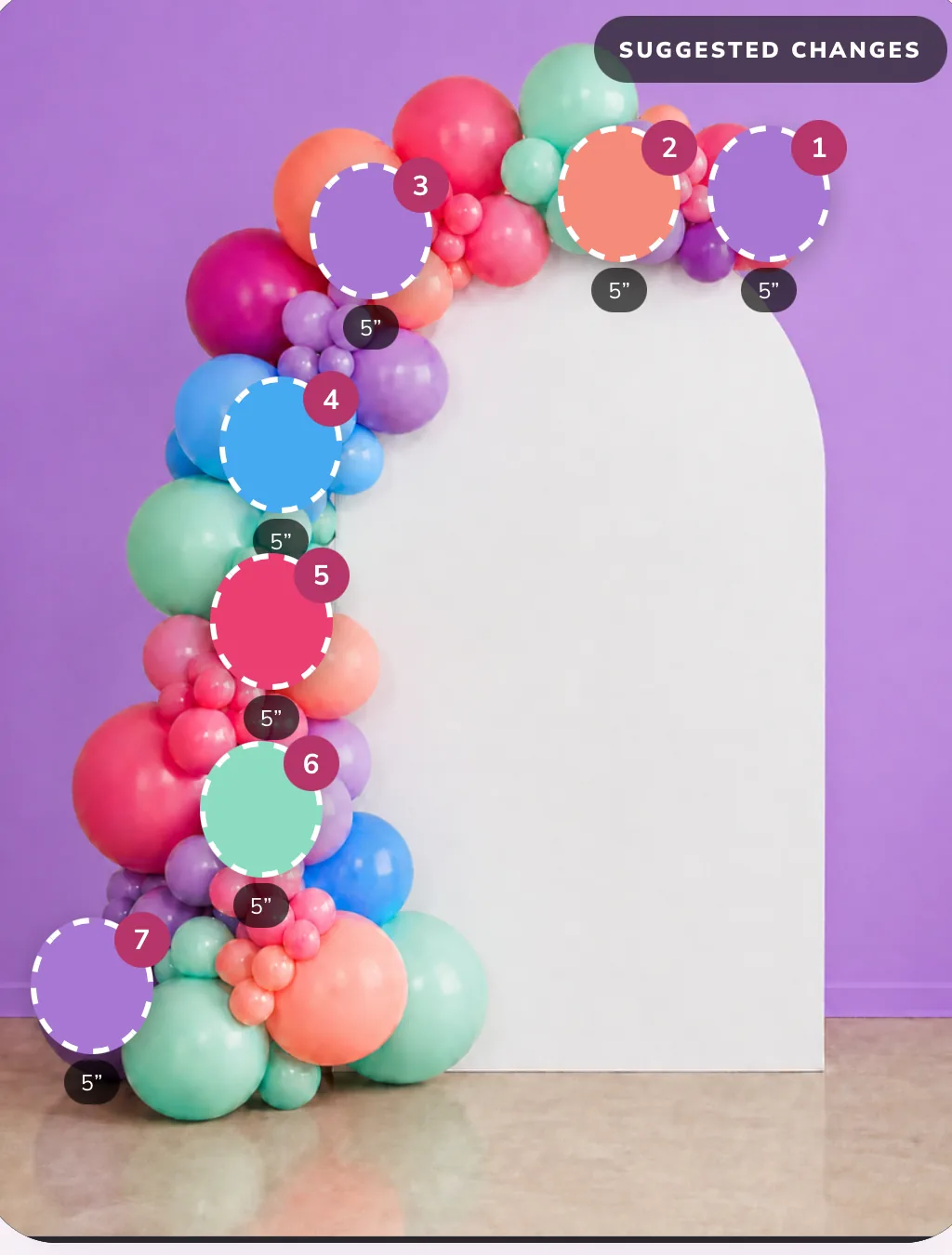
- A design score covering color flow, balance, coverage, balloon sizes and placement, so you can see what is working as well as what is not.
- Suggested placements marked on your photo. Numbered markers show exactly where to add balloons, not a vague note to "fill the gaps."
- What to add: the color, size and count for each suggestion, like "taper the right end with two 5 inch lavender."
- An estimated garland length and balloon quantity read from the photo.
- Lower garland and base suggestions, the part of an installation that is easiest to under-build.
- Kit and shopping recommendations, with similar color matches from popular balloon manufacturers.
How an analysis runs
- Upload a photo or take one with your iPhone camera.
- Choose Beginner or Expert coaching.
- Review the score and the suggested placements on your photo.
- Review what to add, and add items to your kit.
- Save the analysis to your Gallery so you can come back to it on the next job.
Why a photo beats a formula. A per-foot calculator assumes an average garland. The AI reads yours: how tightly you packed the clusters, where the color bunched up, and where the frame is still showing. If you just need a rough count before you have built anything, the free balloon garland calculator is the faster tool.
Beginner or Expert coaching
| Beginner | Expert | |
|---|---|---|
| Best for | New decorators and first garlands | Working artists polishing client installs |
| Feedback | The few changes that matter most | Up to 15 specific suggestions per analysis |
| Placement markers | Yes | Yes, including lower garland and base |
AI for the rest of the design
The garland check is one of three AI tools in BalloonFlow AI.
- Theme Studio takes an idea like "sage garden baby shower, soft and airy" and returns a coordinated balloon palette, color-flow advice, a suggested garland length, a balloon-size range, estimated quantities, build steps and a shopping list you can save as a reusable recipe.
- AI mockups generate a realistic backdrop and garland concept to send to a client before you inflate anything. See the balloon mockup app page.
- The Balloon Color Analyzer names every balloon color in an inspiration photo with its hex value, its share of the design, and the closest Tuftex, Gemar and Sempertex matches.
What it does not do
- It reads the photo you give it. Strong shadows, a very tight crop or a garland only half in frame will give weaker suggestions.
- Its counts and lengths are planning estimates. Confirm venue measurements and installation requirements before you build.
- It does not replace an installation-safety or rigging review for large or overhead pieces.
Common questions
What is balloon garland AI?
It is AI that reads a photo of a balloon garland and gives design feedback. In BalloonFlow AI, the garland check scores the design for color flow, balance, coverage, balloon sizes and placement, estimates length and balloon quantity, and marks on the photo exactly where to add balloons, with the color and size for each.
Does it work on a garland I have already built?
Yes. That is what it is built for. Photograph a garland in progress or a finished one, and it tells you where the gaps, flat spots and color clumps are and what to add to fix them.
What is the difference between Beginner and Expert coaching?
Beginner coaching keeps the feedback simple and focuses on the few changes that matter most. Expert coaching goes deeper, with up to 15 specific suggestions per analysis, including lower garland and base placement.
How many AI garland checks do I get?
The 7-day free trial for eligible new subscribers includes 3 AI garland checks for the whole trial. A paid BalloonFlow Pro membership includes 30 AI garland checks a month, which reset monthly and do not roll over.
Can AI design a balloon garland from scratch?
BalloonFlow has two tools for that. Theme Studio turns an event description into a palette, suggested garland length, size range, quantities, build steps and a shopping list. The AI mockup tool generates a realistic backdrop and garland concept to show a client.
Is it free?
BalloonFlow AI is on the App Store for iPhone. The AI features and the business workspace are part of BalloonFlow Pro, which is $29.99 a month and starts with a 7-day free trial for eligible new subscribers. You can cancel anytime in your Apple subscription settings.
Does it work on Android?
Not yet. BalloonFlow AI is built for iPhone, and it also runs on Macs with Apple silicon. An Android version is in development, but it is not available to download yet. Join the Android beta waitlist to get the first invite.