
The design gets the inquiry. The proposal gets the deposit. For most balloon artists the slow part is not the garland, it is the back and forth after it: retyping prices into a document, chasing a signature, sending a payment link, and then remembering who paid what. BalloonFlow AI puts that whole path in the same iPhone app you design in.
What a BalloonFlow proposal does
- Branded with your business name, logo and reply email.
- Priced from the job itself. Balloon quantities, material and labor costs, travel, setup, strike, rental, delivery and rush fees, custom fees, discounts and your target margin roll into the final total and the deposit.
- Visual. Attach a mockup from your Gallery or upload a photo, and the palette colors display clearly without overlapping text.
- Signable. Use the built-in service agreement, edit it, or upload your own contract PDF. The client reviews the complete contract, approves or requests changes, and signs electronically.
- Payable. A signed proposal prepares the deposit step through your own connected Square account. The client presses the secure payment button themselves; the app never charges anyone automatically.
- Tracked. The signed agreement saves under the lead, you get a notification when it is signed and when the deposit lands, and the lead moves itself to Booked and then Paid in Full.
Send it by email, download it as a branded PDF, or share a secure proposal page link.
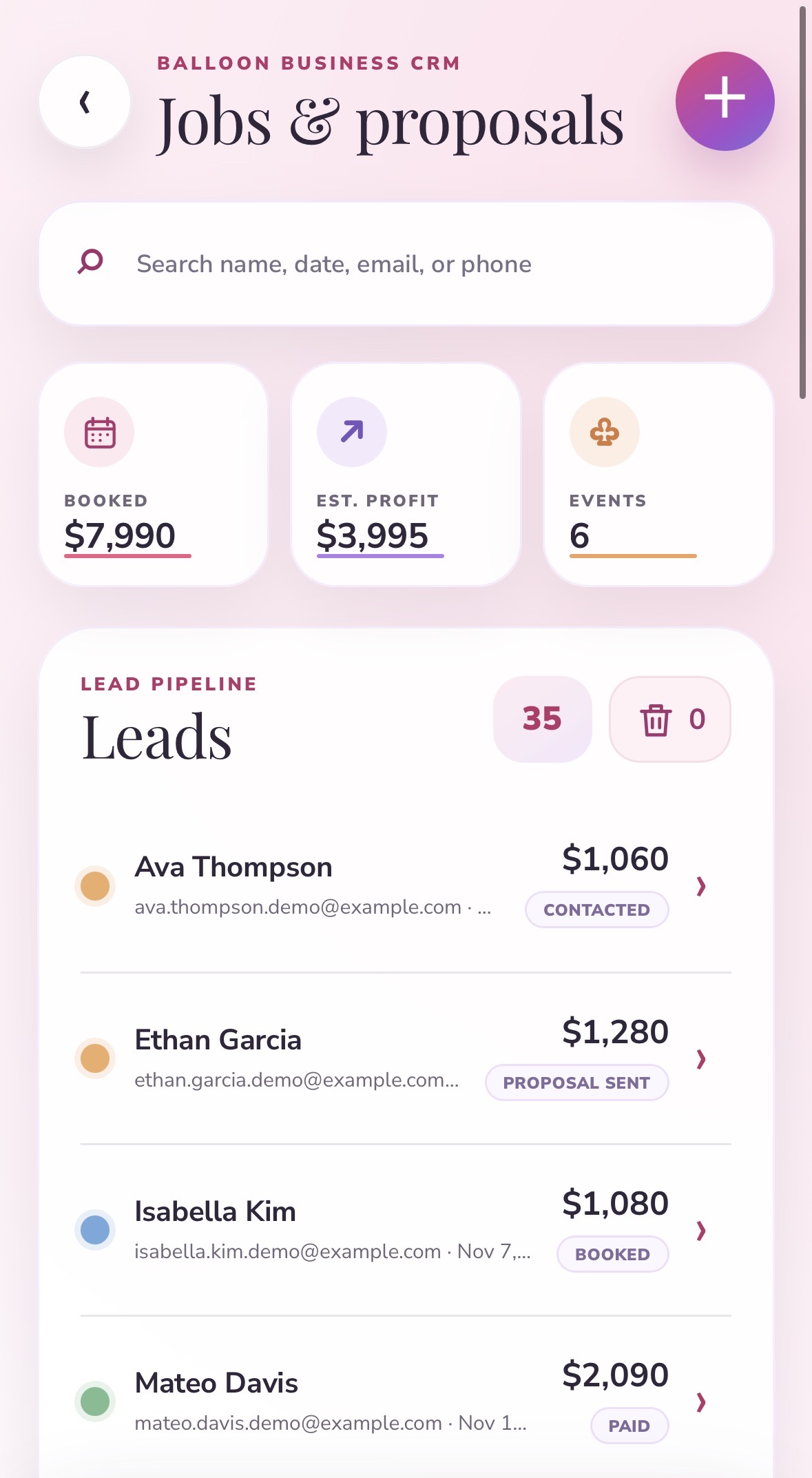
Leads come in already organized
A BalloonFlow quote form can go in your Instagram bio or on your website. Inquiries land straight in the app as leads, so you can go from a stranger's message to a sent contract without copying details between apps.
Free balloon proposal template
Not ready for software yet? Copy this template into a doc and fill in the brackets. It covers what clients most often ask about after they have already said yes, which is exactly what a good proposal should answer up front.
BALLOON DECOR PROPOSAL

[Business name]  |  [Phone]  |  [Email]  |  [Website or Instagram]
Prepared for: [Client name]            Date: [Date]
Proposal valid until: [Date, usually 7 to 14 days]

1. EVENT DETAILS
Event: [Birthday, baby shower, wedding, corporate]
Date: [Event date]      Event time: [Start] to [End]
Venue: [Full address]   Indoor / Outdoor: [ ]
Setup window: [Time]    Takedown / strike: [Time, or "client keeps decor"]
On-site contact: [Name and phone]

2. DESIGN
Description: [e.g. 12 ft organic garland over a double arch backdrop]
Palette: [Color names, e.g. blush, sage, cream, gold chrome]
Sizes: [e.g. 5, 11 and 18 inch latex]
Mockup: [Attached / see page 2]

3. WHAT IS INCLUDED
- [Garland, backdrop, stands, signage, balloon count]
- Delivery and installation
- [Takedown, if included]

4. PRICING
Design, balloons and materials ........ $[ ]
Installation labor ..................... $[ ]
Delivery / travel ...................... $[ ]
Setup / takedown ....................... $[ ]
Rentals (backdrop, stands) ............. $[ ]
Rush fee (if under [X] days) ........... $[ ]
Discount ............................... -$[ ]
TOTAL .................................. $[ ]

5. DEPOSIT AND PAYMENT
A [__]% deposit of $[ ] reserves your date and is due at signing.
The remaining balance of $[ ] is due by [date, e.g. 7 days before the event].
Your date is not held until the deposit is received.

6. TERMS (SUMMARY)
- Changes: design changes after signing may change the price.
- Cancellation: [your deposit and refund policy].
- Weather and venue: outdoor latex can fade, pop or deflate in heat, sun and wind. Venue rules on attachment, helium and setup times apply.
- Rentals: backdrops and stands remain [Business name] property. Damage or loss may be billed.
- Photos: [Business name] may photograph the installation for its portfolio unless you opt out.
- Safety: balloons are a choking hazard for young children. Keep popped pieces away from kids and pets.

7. APPROVAL
By signing, you accept this proposal and the attached terms.
Client signature: ____________________   Date: __________
[Business name]: _____________________   Date: __________
This template is a general starting point, not legal advice. Have your own terms reviewed for your state and business.
Template versus software
| Doc template | BalloonFlow AI | |
|---|---|---|
| Pricing | Typed by hand | Calculated from quantities, costs, fees and margin |
| Mockup | Pasted in | Attached from your Gallery |
| Signature | Print, sign, scan, or a separate e-sign tool | Built-in electronic signature |
| Deposit | Separate payment link | Prepared automatically after signing, through your Square account |
| Status | You keep track | Lead moves to Booked and Paid in Full on its own |
Need the number before you write the proposal? Start with the free balloon garland calculator. Then work out the price with how to price a balloon garland. For the terms that go out with it, copy the free balloon decor contract template. For everything else on the business side, including the booking calendar and reports, see balloon business software.
Common questions
What should a balloon decor proposal include?
Event details (date, times, venue, setup and takedown windows), a design description with the palette and a mockup, exactly what is included, itemized pricing with fees and any discount, the deposit amount and balance due date, a summary of your terms, and a place for the client to sign and date.
How much deposit should a balloon artist take?
Many balloon businesses take a non-refundable deposit of 30 to 50 percent to hold the date, with the balance due a few days to a week before the event. Whatever you choose, state it clearly in the proposal and the contract. This is a common practice, not legal or financial advice.
Can clients sign and pay from the proposal?
Yes. In BalloonFlow AI the client opens a secure proposal page, reviews the full contract, approves it or requests changes, and signs electronically. The deposit step is then prepared and the client pays through your own connected Square account by pressing the payment button themselves.
Does BalloonFlow take a cut of my deposits?
BalloonFlow does not handle client money. Deposits and balances go directly through your own Square account, so Square's own processing fees apply and BalloonFlow never charges your customers automatically.
Can I use my own contract?
Yes. You can edit the reusable service agreement in the app or upload your existing contract as a PDF, and it goes out with the proposal for the client to review and sign.
Is the free template legal advice?
No. It is a starting point showing what a clear balloon proposal usually covers. Have your own terms reviewed by a professional for your state and business.
Is it free?
BalloonFlow AI is on the App Store for iPhone. The AI features and the business workspace are part of BalloonFlow Pro, which is $29.99 a month and starts with a 7-day free trial for eligible new subscribers. You can cancel anytime in your Apple subscription settings.